116182897634678939
前言
LaTeX(/ˈlɑːtɛx/或/ˈleɪtɛx/,常被读作/ˈlɑːtɛk/或/ˈleɪtɛk/,风格化后写作“LaTeX”),是一种基于TeX的排版系统,由美国计算机科学家莱斯利·兰伯特在20世纪80年代初期开发,利用这种格式系统的处理,即使用户没有排版和程序设计的知识也可以充分发挥由TeX所提供的强大功能,不必一一亲自去设计或校对,能在几天,甚至几小时内生成很多具有书籍质量的印刷品生成复杂表格和数学公式,这一点表现得尤为突出。因此它非常适用于生成高印刷质量的科技和数学、物理文档。这个系统同样适用于生成从简单的信件到完整书籍的所有其他种类的文档。(维基百科)
安装LaTeX
1
| wget https://mirrors.jlu.edu.cn/CTAN/systems/texlive/Images/texlive2024-20240312.iso
|
1
2
| hdiutil attach texlive2024-20240312.iso -noverify -mountpoint /Volumes/TeXLive2024
cd /Volumes/TeXLive2024
|
项目结构
1
2
3
| + <project_name>
+ src
- main.tex
|
代码结构
1
2
3
4
5
| \documentclass{article}
导言区域
\begin{document}
正文区域
\end{document}
|
中文支持
- 修改编译器为XeTex
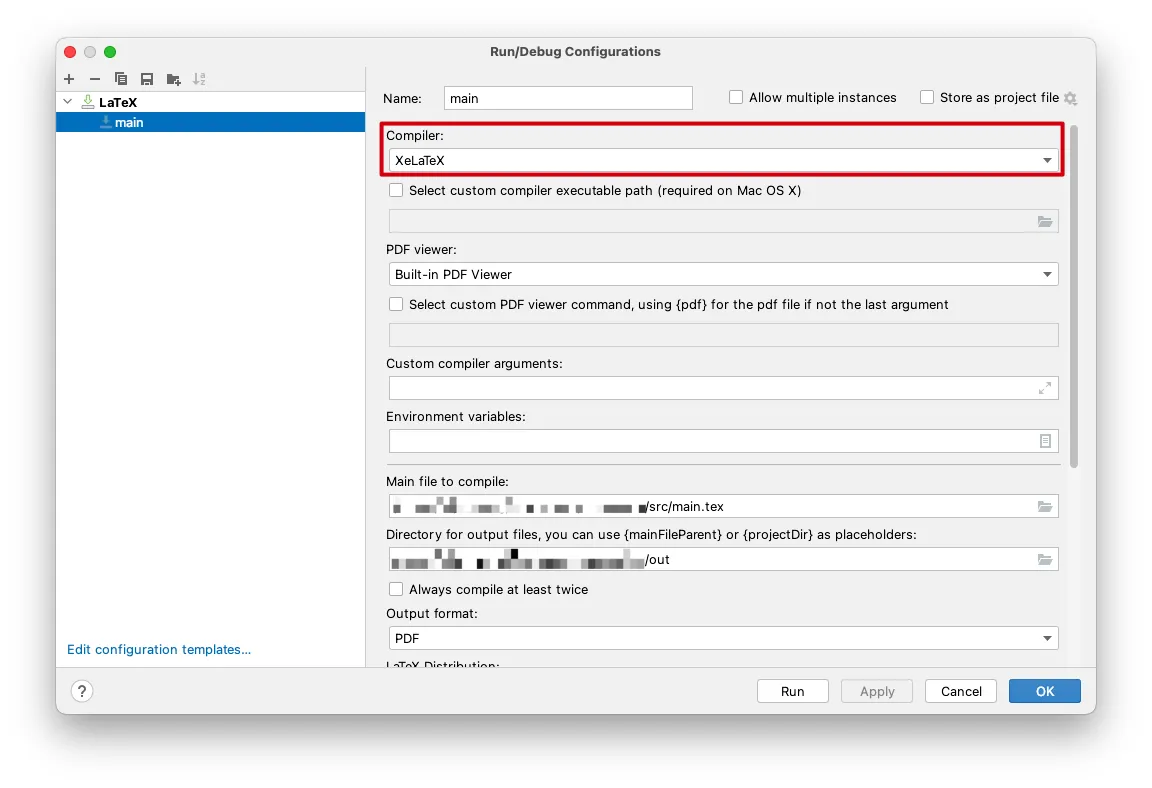
- 设置文档类型为
ctexart,也就是ctex+article类型
1
2
3
4
5
| \documentclass{ctexart}
导言区域
\begin{document}
正文区域
\end{document}
|
注释
分段
换行
抄录环境
1
2
3
| \begin{verbatim}
...
\end{verbatim}
|
目录
定义目录中展示的层级
1
2
3
4
5
| \verb=\part{}= 篇 \part
\verb=\chapter{}= 章 \part
\verb=\section{}= 节 \part
\verb=\subsection{}= 小节 \part
\verb=\subsubsection{}= 小小节 \part
|
文内定义层级
无序列表
1
2
3
4
| \begin{itemize}
\item 文本内容
\item 文本内容
\end{itemize}
|
无序列表嵌套无序列表
1
2
3
4
5
6
7
8
| \begin{itemize}
\item 文本内容
\item 文本内容
\begin{itemize}
    \item 文本内容
    \item 文本内容
\end{itemize}
\end{itemize}
|
无序列表嵌套有序列表
1
2
3
4
5
6
7
8
| \begin{itemize}
\item 文本内容
\item 文本内容
\begin{enumerate}
\item 文本内容
\item 文本内容
\end{enumerate}
\end{itemize}
|
有序列表
1
2
3
4
| \begin{enumerate}
\item 文本内容
\item 文本内容
\end{enumerate}
|
有序列表嵌套有序列表
1
2
3
4
5
6
7
8
| \begin{enumerate}
\item 文本内容
\item 文本内容
\begin{enumerate}
\item 文本内容
\item 文本内容
\end{enumerate}
\end{enumerate}
|
有序列表嵌套无序列表
1
2
3
4
5
6
7
8
| \begin{enumerate}
\item 文本内容
\item 文本内容
\begin{itemize}
\item 文本内容
\item 文本内容
\end{itemize}
\end{enumerate}
|
替换有序列表的序号
1
2
3
4
| \begin{enumerate}
\item[一] 文本内容
\item[二] 文本内容
\end{enumerate}
|
图片
- 在导言区域加载宏包
- 在导言区域定义存放图片的目录路径
- 引入图片
简单的方式
filename.png:图片文件名
1
2
3
4
5
6
| \documentclass{article}
\usepackage{graphicx}
\graphicspath{{figures/}}
\begin{document}
\includegraphics{figures/filename.png}
\end{document}
|
设置图片的宽度为文本宽度
1
| \includegraphics[width=\textwidth]{figures/filename.png}
|
复杂的方式
1
2
3
4
5
6
7
8
9
10
11
12
| \documentclass{article}
\usepackage{graphicx}
\graphicspath{{figures/}}
\begin{document}
如图{fig:标签名}:
\begin{figures}
\centering
\includegraphics{figures/filename.png}
\caption{图片文本注释}
\label{fig:标签名}
\end{figures}
\end{document}
|
表格
1
2
3
4
| \begin{tabular}{2|3}
(1,1)&(1,2)&(1,3)
(2,1)&(2,2)&(2,3)
\end{tabular}
|
数学
1
2
3
4
| \begin{align}
a & = b + c \\
& = d + e
\end{align}
|
脚注
引用
- 把引用的来源添加到
.bib文件中
- 引入引用
特殊符号
| 符号 |
代码 |
| LaTeX花体字 |
\LaTeX |
‘、“ |
` |
’ |
' |
” |
" |
… |
\dots |
完成
参考文献
哔哩哔哩——起飞学院
哔哩哔哩——小鹏哥9